Your laptop starts charging, then the power bank cuts off. That problem usually comes from power negotiation or load mismatch.
A power bank may stop charging a laptop because the wattage is too low, USB-C Power Delivery negotiation fails, the cable is not rated correctly, the laptop requests more power, the power bank overheats, or its low-current protection shuts down.

I see this problem often in high-capacity power bank projects. Laptop charging looks simple from the outside, but the charger, cable, laptop, and battery pack must agree.
Does The Power Bank Have Enough Wattage For The Laptop?
A laptop power bank must support the voltage and wattage the laptop requests, not only a large mAh number.
A laptop may stop charging if the power bank cannot provide the required USB-C PD wattage or voltage profile. Capacity tells how much energy the power bank stores, but wattage tells whether it can deliver enough power while the laptop is running.

Many users look at mAh first. For laptop charging, wattage is often more important. A 20,000mAh power bank can still fail if it only outputs 18W or 22.5W. A laptop may need 45W, 65W, 100W, or more depending on model and workload.
USB Power Delivery is the common negotiation system for USB-C charging. USB-IF provides official information about USB compliance and specifications.1 The basic idea is that the power source, cable, and device communicate before higher power is delivered. If they cannot agree, charging may stop, slow, or fall back to a lower level.
| Laptop need | Power bank output | Likely result |
|---|---|---|
| 30W ultrabook | 45W PD power bank | Usually works |
| 65W laptop | 30W power bank | May charge slowly or stop |
| 100W laptop | 65W power bank | May drain under load |
| Gaming laptop | 100W power bank | Often insufficient |
| Sleep charging | Lower power needed | More likely to work |
The laptop workload matters. A laptop may charge from a 45W power bank while asleep, then stop charging when the user opens software, brightens the screen, or starts video editing. The power bank is not necessarily broken. The laptop is asking for more power than the power bank can provide.
Some laptops also reject lower-power sources or show a warning. Others accept the source but slowly drain because usage exceeds input. Users describe both cases as “the power bank stopped charging,” but the engineering cause is different.
For brands, the product page should not sell laptop compatibility only by capacity. It should list maximum USB-C PD output, supported voltage profiles, cable requirement, and realistic laptop categories. A clear 65W or 100W positioning is better than a vague “charges laptops” claim.
EverGreat often helps buyers match the power bank to the target user. A student ultrabook product can use a different design from a business travel laptop product. The wrong wattage creates returns even when the capacity is honest.
Can The USB-C Cable Cause Laptop Charging To Cut Off?
Yes, the cable can cause charging to stop if it lacks the correct power rating, e-marker, or stable connector quality.
A USB-C cable can make laptop charging cut off when it is not rated for the required current, lacks an e-marker for higher power, has weak connectors, or loses contact during movement. The cable must match the power bank and laptop requirement.
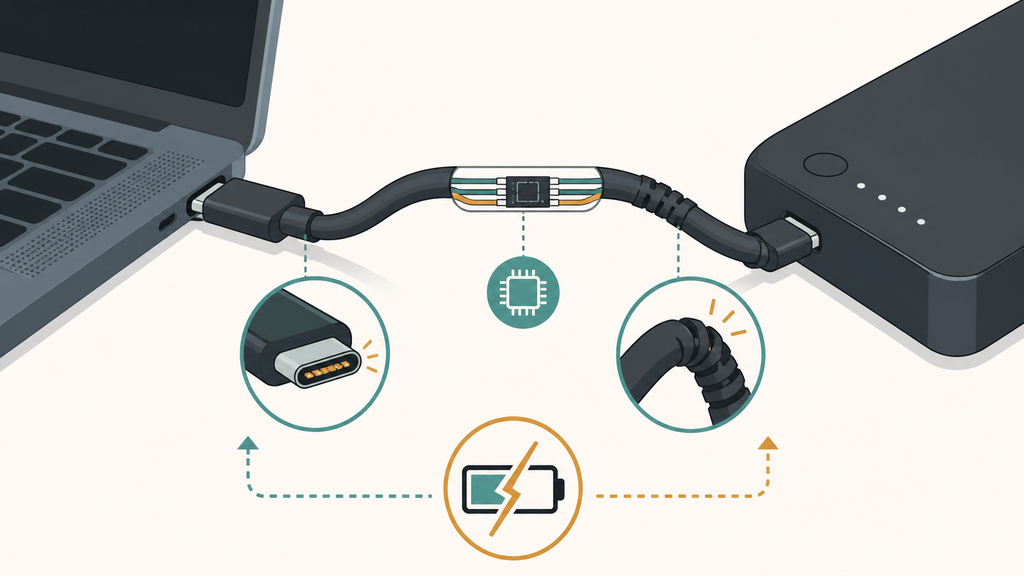
The cable is the part many users underestimate. It looks cheap and simple, but it can decide whether the system reaches higher power. For higher USB-C power levels, the cable specification matters. Some cables are suitable for basic phone charging only. Some are rated for higher current. Some include an e-marker chip that helps identify cable capability.
USB-IF explains USB compliance resources for products in the USB ecosystem.1 For buyers, this means cable claims should be checked, not guessed. A power bank advertised for laptop charging should include or recommend a cable that supports the same power level.
| Cable issue | User symptom | Buyer action |
|---|---|---|
| Low power rating | Laptop does not charge | Specify correct cable |
| No e-marker for high power | Falls back or fails | Verify cable design |
| Loose connector | Charging starts and stops | Test plug fit |
| Poor soldering | Cuts off when bent | Bend-cycle test |
| Long thin cable | Voltage drop risk | Check electrical performance |
Connector wear can also cause cutoffs. A laptop is often used while moving on a desk, sofa, airplane, or train. If the plug fit is loose, charging may disconnect briefly. The laptop then renegotiates. The user sees repeated start-stop behavior.
For private-label power bank bundles, I strongly recommend testing the included cable with the actual product. Do not approve the power bank and cable separately. The customer experiences them as one system. If the cable fails, the power bank gets the bad review.
Cable length is another tradeoff. A longer cable is convenient, but it can be harder to control resistance and voltage drop if the cable is low quality. A short high-quality cable may perform better but feel less convenient. The right decision depends on the target product and customer expectation.
Support teams should ask which cable the user used. Many users replace the original cable with a random USB-C cable from a drawer. That cable may charge a phone but fail with a laptop. This is not obvious to consumers because the connector shape is the same.
For brands, the cleanest approach is to state the cable requirement clearly. If the product supports 65W, include a 65W-rated cable or tell customers what cable they need. If it supports 100W or higher, be even more specific.
What Other Issues Make Laptop Charging Stop?
Laptop charging can stop because of heat, battery protection, low remaining capacity, incompatible protocols, or the power bank’s automatic shutoff behavior.
Laptop charging may stop when the power bank overheats, reaches low battery protection, detects unstable load, cannot support the laptop protocol, or shuts down because current drops too low. Testing should cover real laptop use, not only phone charging.
Laptop charging is harder on a power bank than phone charging. The current is higher. The session is longer. The heat is greater. The customer may use the laptop while charging, which creates a moving load rather than a stable lab condition.
Battery safety deserves attention. The U.S. Consumer Product Safety Commission warns that lithium-ion batteries can present fire and injury risks if damaged, overheated, or poorly handled.2 A laptop power bank must manage heat carefully because high output stresses cells, PCB components, and housing design.
| Cause | What happens | Prevention |
|---|---|---|
| Heat protection | Output shuts down | Improve thermal design |
| Low battery protection | Stops near empty | Explain usable capacity |
| Protocol mismatch | No stable negotiation | Validate with laptops |
| Load change | Start-stop charging | Firmware tuning |
| Weak cells | Voltage sag | Use better cell matching |
Some power banks shut down when the current drops below a threshold. That feature is useful for small devices because it prevents standby drain. But a laptop may change its power draw during sleep, wake, or battery-management events. If firmware is not tuned well, the power bank may shut off at the wrong time.
Thermal design is another challenge. A compact high-wattage power bank may look attractive, but heat needs a path out. Shell material, PCB layout, cell spacing, and protection thresholds all affect user experience. A product that performs for five minutes may fail during a real one-hour laptop session.
Air travel and logistics also matter for high-capacity power banks. The FAA explains that spare lithium batteries and power banks must be carried in carry-on baggage and that watt-hour limits affect travel.3 Buyers should consider capacity, labeling, and travel positioning before choosing a laptop power bank design.
For EverGreat projects, I like to define test laptops early. A generic laptop claim is too broad. Test common ultrabooks, business laptops, tablets, and edge cases. Record whether each charges while asleep, while running, and near low power bank capacity.
The best next step for buyers is to build a compatibility table before launch. It does not need to name every laptop in the world. It should define the realistic wattage class, cable requirement, and conditions where charging may slow or stop.
Conclusion
Laptop charging fails when wattage, PD negotiation, cable quality, heat, firmware, or capacity expectations do not match the real laptop load.
-
USB-IF provides official USB compliance information through its compliance program resources. ↩ ↩
-
The U.S. Consumer Product Safety Commission provides lithium-ion battery safety guidance through its battery safety resources. ↩
-
The FAA explains lithium battery and power bank travel rules in its PackSafe guidance. ↩