Your phone says it is charging, then stops. The case looks harmless, but it may be blocking power, alignment, or heat flow.
You can use a wireless charger with many phone cases, but the case must be thin enough, non-metallic, and properly aligned with the charging coil. Thick cases, metal plates, card holders, and some magnetic accessories can cause slow charging, heat, or failure.

Many customers ask me this because they want one simple answer for every phone case. The real answer is more practical: test the case, charger, phone, and adapter together. Wireless charging is a system, and the case sits directly inside that system.
What Kind Of Phone Case Works With Wireless Charging?
A case usually works if it is thin, flat, non-metallic, and does not push the phone away from the charger coil.
Most slim plastic, silicone, or TPU phone cases can work with wireless charging. Problems are more likely with thick rugged cases, metal parts, wallet cases, ring holders, uneven backs, and accessories placed between the phone and charger.

Wireless charging depends on close coil alignment. The Wireless Power Consortium describes Qi and Qi2 as standards for interoperable wireless power, and Qi2 improves alignment by using a magnetic approach.1 But even with better alignment, distance and interference still matter. A case that adds too much space between the phone and charger can reduce efficiency or stop charging completely.
In daily use, many simple cases work well. Thin TPU, silicone, and plastic cases are usually fine if they are not too thick and do not contain hidden metal parts. The trouble starts when the case becomes a functional accessory. Wallet cases may hold cards. Rugged cases may include metal reinforcement. Kickstand cases may contain hinges. Magnetic plates for car mounts may sit directly over the receiver coil. Each of these can change charging behavior.
I have seen one common B2B mistake: a buyer approves a wireless charger sample using a bare phone, then later receives complaints from users with cases. The charger was not necessarily defective, but the test method was incomplete. If the product is sold to general consumers, case compatibility must be part of sample evaluation.
| Case type | Likely result | Main risk |
|---|---|---|
| Slim TPU or silicone | Usually compatible | Minor heat or speed loss |
| Thick rugged case | Uncertain | Too much distance |
| Wallet case | Risky | Cards and uneven thickness |
| Metal plate case | Often incompatible | Metal interference |
| Magnetic case | Depends on design | Alignment and magnet position |
Apple’s wireless charging guidance notes that magnetic mounts, magnetic cases, or objects between the phone and charger can reduce performance or damage magnetic strips and RFID chips in cards.2 Samsung also recommends removing cases or accessories when wireless charging does not work properly.3 These are not small details; they are the kind of user behavior that creates real support tickets.
For product planning, the best approach is to define the target user. A promotional giveaway charger may meet many ordinary cases but struggle with heavy protective cases. A premium magnetic charger should be tested with compatible magnetic cases. A bedside stand should be tolerant of slightly imperfect placement because users charge at night when they are not paying attention.
Why Does A Phone Case Make Wireless Charging Slow Or Hot?
A case can increase distance, reduce alignment accuracy, trap heat, or add materials that disturb wireless power transfer.
A phone case makes wireless charging slow or hot when it increases the air gap, shifts the coil position, contains metal, traps heat, or prevents the charger from detecting the phone efficiently.
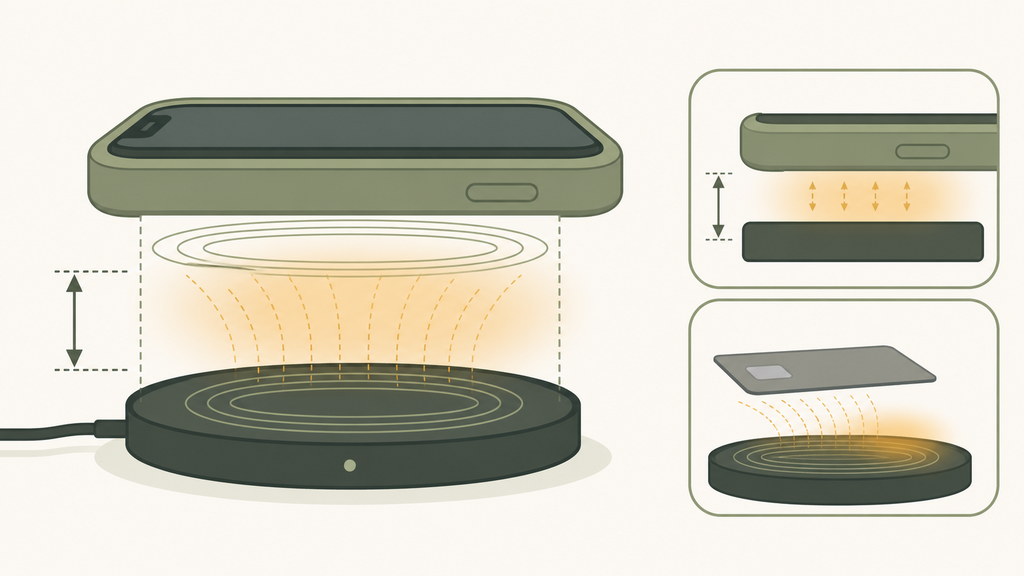
Wireless charging is sensitive to small physical changes. A cable either plugs in or does not. Wireless charging has more gray area. The phone may show a charging icon, but actual power delivery can be lower than expected. The charger may run warmer. The phone may reduce charging speed to protect the battery. The user may think the charger is weak, when the case is the hidden variable.
Distance is the simplest reason. If a thick case pushes the phone farther away, energy transfer becomes less efficient. The charger may compensate within limits, but compensation can create extra heat. Heat then causes the phone or charger to reduce power. This creates the frustrating loop many users describe: “It charges for a while, then slows down.”
Metal is more serious. Coins, keys, metal rings, magnetic plates, and card holders can interfere with wireless charging. Some chargers include foreign object detection, but buyers should not treat that as permission to ignore user behavior. Foreign object detection is a safety feature, not a replacement for clear product design and instructions.
Heat flow is also important. A thick rubberized case may protect the phone from drops, but it can also trap heat during charging. Apple explains that batteries work best within recommended temperature ranges and that software may limit charging when temperature rises.4 From a user perspective, this looks like slow charging. From a manufacturer perspective, it is a thermal management issue.
When I review a wireless charger project, I like to build a small compatibility matrix:
| Test item | Why it matters |
|---|---|
| Bare phone | Establishes baseline performance |
| Slim case | Represents normal daily use |
| Thick case | Shows distance tolerance |
| Magnetic case | Checks alignment and magnet behavior |
| Wallet case removed and attached | Reveals card and thickness issues |
This matrix does not need to be complicated, but it should be consistent. If a supplier says “case friendly,” ask what case thickness was tested, which phone models were used, and whether charging speed and temperature were recorded. Vague claims are easy; useful testing data is harder.
For brands, the goal is not to promise compatibility with every case. That promise is unrealistic. The goal is to define a clear use range, design the product around that range, and communicate it honestly. That reduces returns and builds trust.
How Should Brands Write Case Compatibility Claims?
Brands should avoid broad promises and use specific, testable wording that matches the charger design and sample results.
A good wireless charger case claim should state the compatible case type, thickness limit if tested, metal restrictions, adapter requirement, and placement instructions. Avoid saying “works with all cases” unless it is genuinely proven, which is rare.
Case compatibility language can either reduce complaints or create them. I often see packaging that says “case compatible” with no details. That looks attractive on a product page, but it gives customer service no room to explain real limitations. A user with a wallet case, metal plate, and weak adapter may still expect perfect performance.
Better wording is practical. For example: “Works with most slim non-metal phone cases. Remove metal plates, cards, stands, and thick wallet cases before charging. Use the recommended adapter.” This language is not as flashy, but it is more defensible. It also teaches users how to get better performance.
For B2B buyers, case compatibility should be decided before mass production. The industrial design, coil position, magnet strength, housing thickness, top surface material, and instruction manual all influence the final claim. If marketing writes the claim after production is complete, the product may already be locked into limitations that cannot be fixed without tooling changes.
I recommend this process:
| Step | Decision |
|---|---|
| Define target phones | iPhone, Android, Qi, Qi2, or mixed use |
| Define case range | Slim case, magnetic case, or bare-phone priority |
| Test speed and heat | Do not rely only on charging icon |
| Review packaging copy | Match claims to test evidence |
| Prepare support scripts | Explain common user fixes clearly |
Qi2 makes compatibility more interesting because magnetic alignment can improve placement consistency.1 But brands still need to be careful. A magnetic case that aligns well can improve the experience. A poorly designed case or incompatible magnet position can create a bad experience. The standard helps, but it does not remove product responsibility.
EverGreat customers often ask whether they should position a product as “case friendly.” My answer is usually: yes, if we define the case type and test it properly. For a desk stand, case compatibility may be a core selling point. For a compact promotional wireless charger, it may be better to keep claims conservative and focus on reliability.
The safest strategy is to write claims the way an engineer would test them. If the words on the box can be verified in a simple test, the claim is probably strong. If the claim depends on ideal conditions and many hidden exceptions, it will likely become an after-sales problem.
Conclusion
Wireless charging can work through many cases, but brands should test and describe the limits before promising universal compatibility.
-
The Wireless Power Consortium Qi2 page explains the role of improved magnetic alignment in the Qi2 standard. ↩ ↩
-
Apple covers wireless charging behavior and accessory cautions in its iPhone wireless charging support guidance. ↩
-
Samsung recommends removing some cases or accessories in its wireless charging troubleshooting guidance. ↩
-
Apple explains battery temperature and performance considerations on its Batteries and Performance page. ↩