A blinking wireless charger feels broken. Sometimes it is a simple alignment issue. Sometimes it is a safety warning.
A wireless charger may blink and stop charging because the phone is misaligned, a metal object is detected, the case is too thick, the adapter is underpowered, the charger overheats, or the phone does not support the charger’s wireless standard.

I see this complaint often in wireless charger projects. The LED is trying to tell the user something, but most manuals do not explain the signal clearly enough.
Does Blinking Mean The Wireless Charger Detected A Problem?
In many chargers, blinking means the charger has detected an abnormal condition or cannot start stable charging.
A blinking wireless charger often means charging did not start correctly. The most common causes are poor coil alignment, foreign object detection, incompatible adapter power, thick cases, heat protection, or a phone that does not support wireless charging.

Wireless charging looks simple because there is no plug going into the phone. Inside the product, the charger still needs to detect the phone, align with the receiver coil, transfer power, watch temperature, and protect against unsafe objects.
The Wireless Power Consortium manages the Qi wireless charging standard and certification ecosystem.1 Qi products use communication and control behavior to support safe power transfer. If the charger cannot confirm a stable condition, many designs blink, pause, or refuse to charge.
| Blinking situation | Likely reason | First action |
|---|---|---|
| Blinks immediately | Phone not detected | Reposition phone |
| Blinks with case on | Case interference | Try without case |
| Blinks near metal object | Foreign object detection | Remove object |
| Blinks after minutes | Heat protection | Let it cool |
| Blinks with weak adapter | Not enough input power | Use correct adapter |
Alignment is the first thing to check. The transmitter coil in the charger and receiver coil in the phone need to sit close to each other. If the phone is too high, too low, or shifted sideways, the system may start and stop. The user sees a blinking light.
Foreign object detection is another common cause. A coin, key, metal ring, magnetic plate, or wallet card between the phone and charger can create risk. A good charger should react to this rather than blindly pushing power. From a user point of view, blinking is annoying. From a safety point of view, it can be the correct behavior.
The adapter also matters. A wireless charging pad may need a power adapter that supports enough input wattage. If a customer uses an old 5W adapter with a faster wireless charger, the product may behave unpredictably or charge very slowly. The charging pad gets blamed, even when the input source is the bottleneck.
For brands, LED behavior needs clear documentation. A single blinking pattern should not be used for every possible fault if support volume matters. If the same light means alignment error, metal detection, and overheating, the user has no useful clue.
At EverGreat, I prefer simple LED logic with clear manual wording. The customer does not need engineering detail. They need to know what to remove, what to reposition, and when to stop using the product.
Can A Phone Case Or Metal Object Make A Wireless Charger Blink?
Yes, cases and metal objects are among the most common reasons wireless chargers blink and refuse to charge.
A phone case can make a wireless charger blink if it is too thick, contains metal, includes wallet cards, uses a ring stand, or prevents the phone from lying flat. Remove the case and nearby metal objects to test the charger.
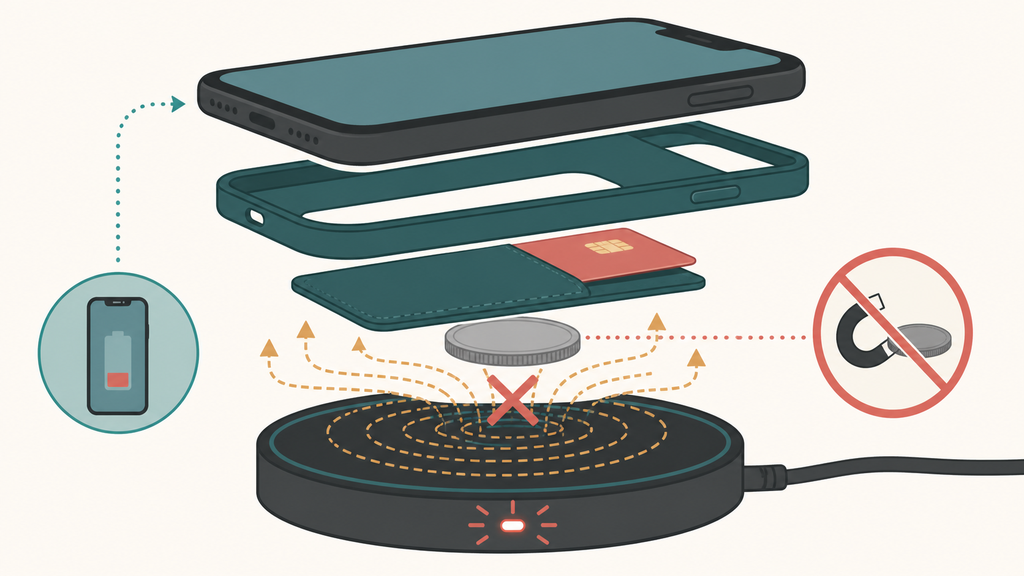
The phone case is often the hidden variable. Users change the case, add a wallet, attach a metal car-mount plate, or use a ring stand. The charger did not change, but the charging path changed.
Apple explains that wireless charging can be affected by items between the iPhone and charger, including magnetic mounts, magnetic cases, and other objects.2 That advice matches what I see in product support. The object between the phone and charger often explains the complaint.
| Object or case issue | What happens | User test |
|---|---|---|
| Thick rugged case | Coil gap increases | Charge without case |
| Metal plate | Charging may stop | Remove plate |
| Wallet case | Cards block contact | Empty or remove wallet |
| Ring grip | Phone sits unevenly | Remove grip |
| Camera bump gap | Coil misalignment | Rotate or reposition |
Heat can join the problem. If the phone is not aligned well, energy transfer becomes less efficient. The phone or charger may warm up. Many phones reduce charging speed or pause charging when temperature rises. Apple says charging can slow or stop if an iPhone becomes too warm.3 Other phones use similar protective ideas.
For wireless charger buyers, this is why I do not like broad “works with all cases” claims. A thin plastic case is very different from a thick rugged wallet case with metal pieces. A product can support many cases but not every case.
I usually recommend a case test matrix before production. Test bare phone, thin TPU case, silicone case, magnetic case, rugged case, wallet case, and case with metal car-mount plate. Record whether the charger starts, whether it blinks, whether it stays stable, and whether the temperature rises.
Support teams should start with simple questions. Did the charger ever work? Did the user change the case? Is there a metal plate? Does it blink with the phone removed? Does it blink only after heating up? These questions reduce unnecessary returns.
For brands, the product page should set expectations before the sale. Clear compatibility notes protect trust. A customer who understands the limit is less likely to feel misled when a wallet case blocks charging.
What Should Buyers Check Before Selling Wireless Chargers?
Buyers should check LED logic, coil alignment, adapter requirements, foreign object detection, temperature behavior, and certification claims.
Before selling wireless chargers, buyers should test LED fault behavior, phone alignment tolerance, case compatibility, adapter input requirements, foreign object detection, heat rise, and Qi or Qi2 certification documentation. These checks reduce blinking complaints and returns.
Wireless charger returns often come from unclear user experience rather than total product failure. The charger may work under correct conditions, but the customer does not know those conditions. That is a product design and documentation problem.
The first test is alignment tolerance. Place different phones slightly off center and see when charging stops. A charger with a very narrow sweet spot may pass a perfect-position lab test but fail on a nightstand. Magnetic alignment can help when the phone and case support it, but it does not remove the need for good design.
| Buyer check | Why it matters |
|---|---|
| LED meaning | Reduces support confusion |
| Alignment tolerance | Improves daily use |
| Adapter requirement | Prevents underpowered input |
| Case testing | Reduces returns |
| Thermal test | Protects performance |
| Certification review | Supports market claims |
Certification language also matters. If a product claims Qi or Qi2 support, buyers should confirm whether the claim is supported by real documentation from the appropriate program. The WPC maintains the Qi standard and product ecosystem.1 A vague supplier statement is not enough for serious retail or brand work.
Wireless chargers may also need market-specific compliance beyond charging performance. In the U.S., the FCC explains equipment authorization requirements for RF devices.4 Buyers should confirm the applicable path before import because wireless chargers are not only plastic accessories.
The manual should translate LED behavior into action. A helpful manual might say: if the light blinks, remove metal objects, remove thick cases, center the phone, use the recommended adapter, and let the charger cool. If the charger smells burnt, cracks, or gets unusually hot, stop using it.
EverGreat often helps customers improve these small details before production. Better LED logic, clearer instructions, and realistic compatibility claims can reduce returns without changing the whole product.
The important lesson is that blinking is not just a light. It is part of the support system. If the signal teaches the customer what to do, the product feels smarter. If it only creates anxiety, the product feels broken.
Conclusion
A blinking wireless charger usually signals alignment, object detection, input power, heat, or compatibility problems. Clear testing and instructions prevent many returns.
-
The Wireless Power Consortium explains Qi and Qi2 through its official Qi resources. ↩ ↩
-
Apple explains wireless charging interference issues in its iPhone wireless charging guidance. ↩
-
Apple describes temperature-related charging behavior in its iPhone temperature guidance. ↩
-
The FCC provides RF device authorization information through its equipment authorization resources. ↩