A dead phone and a full power bank should not happen together. When it does, the cause is usually simple, but easy to miss.
Your power bank may not charge your phone because the cable is weak or damaged, the port is dirty, the output is too low, the phone blocks charging, the power bank is empty, overheated, asleep, or incompatible with the phone’s charging protocol. Test one part at a time.

I have handled many charging complaints that looked like product failure at first. Most were really cable, port, protocol, or user-experience problems that could be found with a simple checklist.
Is The Cable Or Port Stopping The Charge?
Many people blame the power bank first. In real support cases, the cable and phone port often cause the problem.
A power bank will not charge a phone if the cable is damaged, too weak, loose, or blocked by lint in the phone port. Try another known-good cable, check both connectors, clean visible debris safely, and test the same power bank with another phone.

Apple’s own support page for an iPhone that won’t charge tells users to check the cable and USB adapter for damage, use firm connections, try a power source, remove debris from the charging port, and let the device charge for a set period before assuming service is needed.1 Google’s page for a Pixel phone that won’t charge gives similar advice: confirm the cable and adapter work, check that the cable is securely connected, make sure nothing is in the port, and try another cable or power adapter.2
That advice matches what I see in product support. A cable may look normal but fail under load. A USB-C connector may feel inserted but not sit fully because a phone case is too thick. A port may have pocket lint packed so tightly that the connector cannot reach the contacts. A cable may charge earbuds but fail with a phone because the current demand is higher.
Here is the fastest test sequence:
| Test | What It Tells You | What To Do Next |
|---|---|---|
| Try another cable | Confirms cable damage or low capability | Replace the cable if charging starts |
| Try another phone | Checks whether the power bank output works | Inspect the original phone if it fails |
| Try another output port | Finds a bad port or wrong output mode | Use the USB-C port if available |
| Remove thick case | Checks connector seating | Use a cable with a longer plug shell |
| Inspect port gently | Finds dust, lint, or bent contacts | Clean safely or seek repair |
I would not push a connector harder when it feels blocked. Forcing it can damage the phone port or the cable plug. I also avoid telling users to scrape inside the port with metal tools. If there is visible debris, the safe path is gentle cleaning and professional service when the port looks damaged.
For brands and retailers, this is also a packaging lesson. A good power bank should include clear cable guidance. If the product supports USB-C fast charging, the user should know whether the included cable supports that speed. Many returns can be avoided by explaining cable and port checks in the manual.
Is The Power Bank Output Too Weak For Your Phone?
Sometimes the power bank is not broken. It is simply not providing the voltage, current, or protocol the phone expects.
Your phone may reject or slow charging if the power bank output is too low, the USB-A port only provides basic power, or the USB-C PD/PPS protocol does not match. Use a power bank with enough wattage and the right output port for your phone.
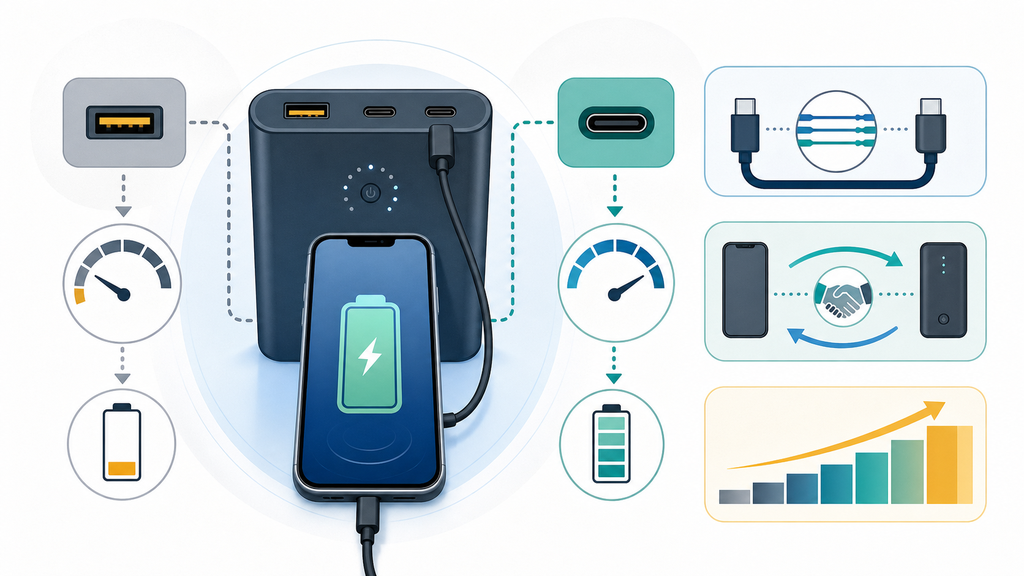
Modern phones do not all charge the same way. Some charge well from basic 5V output. Some need USB Power Delivery for faster charging. Some Android phones use PPS for better fast-charging behavior. Google says Pixel phones get the best battery experience and charging speeds from a Google 30W USB-C PPS adapter or other USB Power Delivery adapters rated for 15W or more, while actual speeds vary by Pixel model.2 The same idea applies to power banks: the label matters, but the supported protocol matters too.
USB-IF explains that USB Power Delivery allows more flexible power delivery over one cable and that USB PD Revision 3.1 can support up to 240W over a full-featured USB Type-C cable and connector.3 Most phone power banks do not need 240W, of course. The useful lesson is that USB-C charging is negotiated. The phone, cable, and power bank must agree on what power level is safe.
Many customers ask me why their phone shows "charging" but gains battery very slowly. The answer is often one of these:
| Situation | Likely Reason | Better Choice |
|---|---|---|
| Phone loses battery while plugged in | Output is below phone usage demand | Use a higher-watt USB-C PD power bank |
| Charging starts and stops | Cable, port, or protocol instability | Try a certified cable and another port |
| Fast charging does not appear | Wrong protocol or low wattage | Check PD/PPS support and phone specs |
| Only USB-A port works slowly | Legacy output is limited | Use USB-C output when possible |
| Power bank shuts off | Load is too low or protection triggers | Wake the power bank or use another mode |
The product label can also confuse users. A power bank may say 20,000mAh, but that describes battery capacity, not phone charging speed. A user who expects faster charging should look for output wattage, such as 20W, 30W, 45W, or 65W, and the protocol names. A large-capacity power bank with only low-output ports can still charge slowly.
From a manufacturing perspective, I pay attention to port priority and shared output. A multi-port power bank may advertise 65W max, but that maximum may drop when two devices are plugged in. This is normal if the power-sharing rule is stated clearly. It becomes a customer complaint when the package only shows the best-case number.
For buyers, the practical answer is simple: match the power bank to the phone and use case. A basic phone may be fine with 18W or 20W. A flagship phone may benefit from 30W or PPS support. A phone plus tablet or laptop travel kit may need 45W to 65W. Buying the highest number is not always necessary, but buying without checking output is where many charging problems begin.
Is The Phone Or Power Bank Protecting The Battery?
Not every charging stop is a fault. Phones and power banks may pause charging to protect the battery or the circuit.
Charging may stop because the phone is too warm, the battery has reached a protection limit, optimized charging is active, the power bank is overheated, or the power bank’s low-current detection turns off. Let devices cool, restart them, and test again.
Apple explains that iPhones may stop charging at 80 percent because of Optimized Battery Charging, battery temperature, or charge limit settings on newer models.1 This matters because users often think "not charging to 100 percent" means the power bank failed. In reality, the phone may be choosing to slow or pause charging to protect battery life.
Heat is another common issue. A phone charging inside a car, under a pillow, or while gaming can become warm. A power bank can also become warm during high-output charging. If both devices are warm, charging may slow, pause, or restart. This is not a good moment to blame only one product. Move both devices to a cooler place, unplug them for a few minutes, and test again with the screen off.
The WIRED fast-charging guide also points out that fast charging depends on matching the phone, charger, cable, wattage, and charging protocol, not only buying one high-watt accessory.4 That is important because protection behavior is part of the charging system. A phone may refuse an unstable setup even if the power bank looks powerful on paper.
I often divide protection problems into three groups:
| Symptom | Possible Protection Reason | User Action |
|---|---|---|
| Stops near 80 percent | Phone battery management | Check battery settings and temperature |
| Stops after a few seconds | Protocol or cable instability | Try a better cable and USB-C PD port |
| Power bank turns off | Low-current device or sleep mode | Press the power button or use low-current mode |
| Charging slows in heat | Thermal protection | Cool both devices before testing |
| No output after storage | Deep discharge or aging | Recharge power bank fully and retest |
Some power banks also sleep when the connected device draws very little current. This can happen with earbuds, smartwatches, or a phone already near full battery. Better models may include a low-current mode. If a user charges small accessories often, that feature becomes more valuable than a bigger capacity number.
For product buyers, this is where quality control and support design matter. A reliable power bank should have clear protection logic, stable protocol negotiation, safe thermal design, and a manual that explains common states. It should not leave the user guessing whether a blinking light means empty battery, protection mode, or output error.
EverGreat’s view is practical: a good power bank is not only a battery cell inside a case. It is a full charging experience. The cable, output protocol, port layout, heat behavior, instructions, and after-sales troubleshooting all shape whether users trust the product after the first problem.
Conclusion
Most power bank charging problems come from cable, port, protocol, wattage, heat, or battery protection. Test each part before replacing the product.
-
This Apple Support page supports the troubleshooting steps for damaged cables, firm connections, port debris, power sources, restart, and 80 percent charging behavior. ↩ ↩
-
This Google Pixel Help page supports the troubleshooting steps for cable, adapter, outlet, dust or lint, compatible PD/PPS chargers, and slow or unsupported charging warnings. ↩ ↩
-
This USB-IF page supports the explanation of USB Power Delivery, flexible power negotiation, and high-power USB-C capability. ↩
-
This WIRED guide supports the explanation that fast charging depends on phone, cable, charger, wattage, and charging protocol compatibility. ↩