Your phone starts charging, stops, then starts again. That small flicker can point to a cable, port, charger, heat, or design problem.
A charger keeps disconnecting when the cable is damaged, the charging port is dirty or loose, the adapter output is unstable, the phone gets too hot, or the charger and device fail to negotiate power correctly. Wireless chargers can also disconnect when alignment is poor.

I have seen this issue create more frustration than slow charging because it feels random. The user hears the charging sound repeatedly, wakes up with a low battery, and blames the whole charging product. A good diagnosis starts by separating mechanical, electrical, and software causes.
Is The Cable Or Charging Port Causing The Disconnection?
The cable and port are the first things to check because they move, wear, collect dust, and fail more often than the wall charger.
A charger often disconnects because the cable plug is loose, the cable is internally damaged, the charging port contains lint or debris, or the connector no longer makes steady contact with the phone.
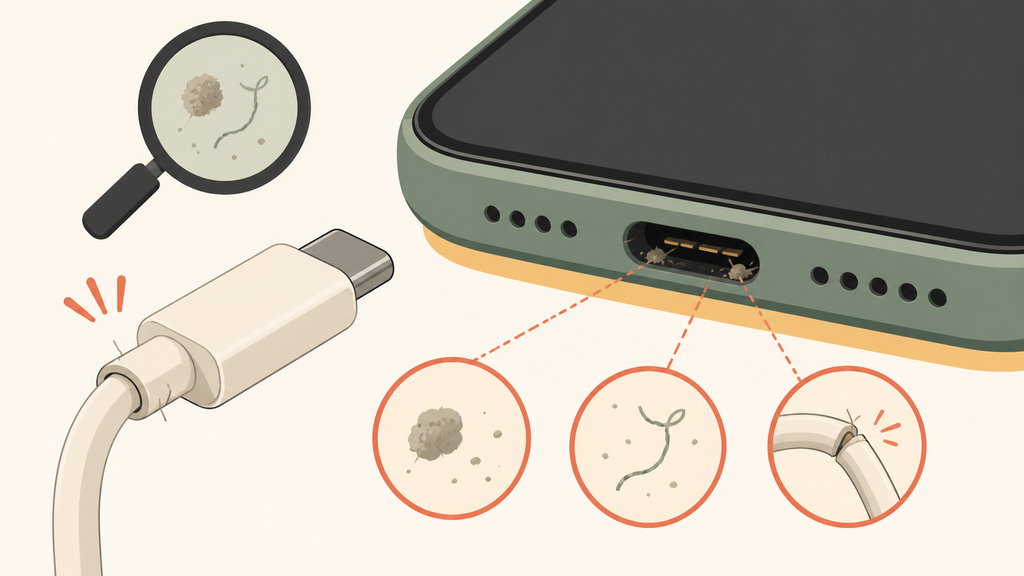
Charging problems often begin with movement. A cable may look normal outside but break internally near the connector. The phone may charge on a desk, then disconnect when the cable bends. A port may also collect lint, dust, or pocket debris, which prevents the connector from seating fully. Apple advises users to check the charging cable, adapter, and charging port when an iPhone will not charge, and to remove debris from the port carefully if needed.1
In my experience, users usually test the adapter first because it is the most visible part. The cable is more likely to be the weak point. A cable is bent, pulled, twisted, packed in bags, and plugged in many times per day. Low-cost cables may use weak strain relief, thin conductors, loose connector shells, or poor soldering. Those flaws can create intermittent charging long before the cable completely fails.
The port also matters. A loose phone port can make even a good cable feel unreliable. Users may push the plug harder or hold it at an angle. That can make the mechanical problem worse. From a support perspective, the right question is not only “does it charge?” but “does it stay charging when the phone or cable moves?”
| Symptom | Likely cause | Practical test |
|---|---|---|
| Charges only at one angle | Worn cable plug or port | Try a known-good cable |
| Disconnects when moved | Broken wire or loose connector | Wiggle cable gently |
| Plug does not seat fully | Debris in port | Inspect port carefully |
| Cable feels hot near plug | High resistance or poor contact | Stop using and replace |
| Works with one phone only | Compatibility or port condition | Test another phone |
For B2B buyers, this is why cable quality should not be treated as a free accessory. A charger kit can fail in the user’s mind because the cable is weak, even when the adapter is stable. If the package includes a cable, the cable must match the current rating, protocol, connector durability, and daily use pattern.
I often recommend bend tests, plug-in tests, connector inspection, and long-session charging tests before mass production. A cable that passes a quick function test can still fail after repeated movement. That is where good quality control saves after-sales cost.
Can The Wall Charger Or Power Bank Cause Repeated Disconnecting?
Yes. A weak adapter or power bank can disconnect when its output is unstable, overloaded, overheated, or unable to communicate properly with the device.
A wall charger or power bank can cause repeated disconnecting if it cannot supply stable voltage, if its protection circuit trips, if the fast-charging protocol negotiation fails, or if the device draws more power than the charger can handle.
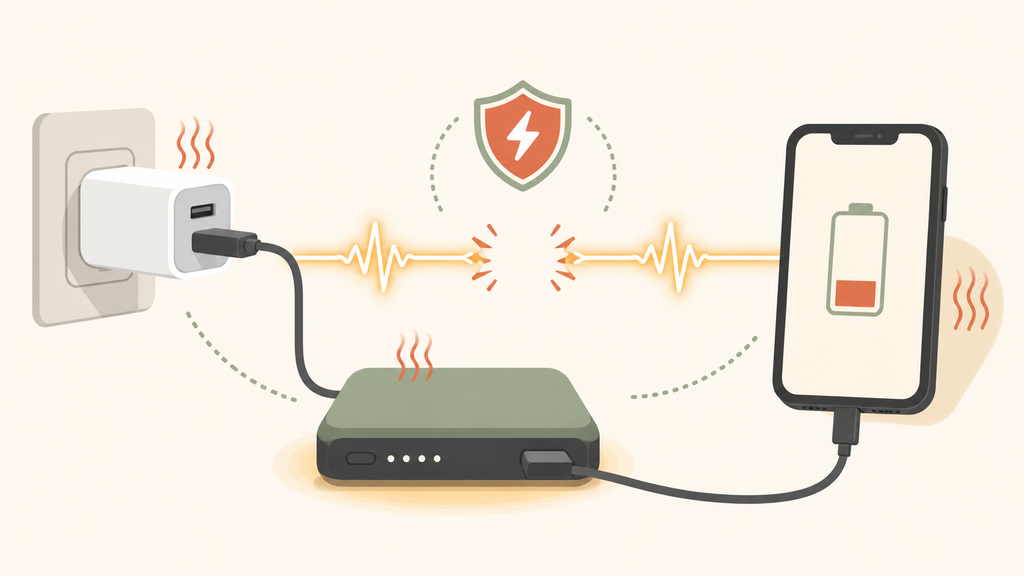
Modern charging is not only about voltage and current. A phone, cable, and charger often negotiate the correct charging mode. USB-IF provides compliance and certification programs for USB products so devices can work together more reliably under defined standards.2 If a charger, cable, or power bank does not follow the expected behavior, the phone may start charging, reject the mode, drop to a lower power level, or disconnect.
A weak wall charger may also trip its own protection. If the phone requests more power than the charger can deliver, the charger may shut down briefly and restart. The user sees this as repeated disconnecting. This can happen with old adapters, poor-quality fast chargers, overloaded multi-port chargers, or adapters with weak thermal design.
Power banks add another layer. Some power banks turn off when the load is too low. Some reset when the cable connection is unstable. Some have ports that wear out after heavy use. I have seen users connect a phone, cable, and power bank, then blame the phone when the real issue was a power bank port that had become loose.
| Accessory issue | User sees | Buyer-side risk |
|---|---|---|
| Underpowered adapter | Start-stop charging | Bad reviews about “not fast” |
| Poor protocol support | No fast charging or disconnects | Compatibility complaints |
| Multi-port overload | One device drops out | Returns on desktop chargers |
| Power bank auto-off | Phone stops charging | Confusion with low-current devices |
| Weak thermal design | Charging pauses | Safety and trust concerns |
Counterfeit or uncertified accessories can also create strange behavior. Apple warns that counterfeit or uncertified charging accessories may damage devices, fail to sync or charge, or create connector problems.3 The same principle matters for USB-C chargers and cables. If the accessory cannot maintain a clean, stable connection, the phone may protect itself by stopping the session.
For brands, this makes product matching important. A fast charger should be sold with a cable that supports the expected power. A multi-port charger should be tested with all ports loaded, not only one phone. A power bank should be tested with real phones, earbuds, watches, and low-current devices if those use cases are advertised.
At EverGreat, we often look at the whole charging set. A stable adapter with a poor cable is not a stable product. A good power bank with unclear instructions can still create support problems. The user experiences the system, not the bill of materials.
Why Does Wireless Charging Disconnect Again And Again?
Wireless charging disconnects when alignment, heat, case thickness, metal objects, or adapter input problems interrupt stable power transfer.
Wireless charging can disconnect repeatedly when the phone is off-center, the case is too thick, metal accessories interfere, the charger overheats, or the wall adapter cannot provide stable input power to the wireless pad.
Wireless charging feels simpler because there is no plug. In reality, it adds different failure points. The phone must sit in the right position over the transmitter coil. If it shifts, vibrates, or rests on an uneven case, the charger may start, stop, and start again. Samsung’s wireless charging troubleshooting guidance recommends checking cases, accessories, and proper placement when wireless charging does not work.4
Heat also affects wireless charging. If the phone or pad gets too warm, charging may slow or pause. Apple notes that charging can be affected by temperature and may be placed on hold when the device becomes too warm.5 This is not a defect by itself. It is a protection behavior. But if the charger design creates too much heat, users experience it as unreliable charging.
Cases are a frequent cause. A thick rugged case increases distance. A wallet case may contain cards. A magnetic plate for a car mount may sit between the phone and coil. A decorative metal ring can interfere with power transfer. Users may not connect the case to the problem because the phone still shows the charging icon for a moment.
For wireless chargers, I recommend a simple test:
| Test | What it reveals |
|---|---|
| Bare phone centered | Baseline charger performance |
| Phone with normal case | Real daily use |
| Slightly off-center phone | Alignment tolerance |
| Long charging session | Heat stability |
| Recommended adapter | Input power stability |
For OEM and ODM projects, wireless charger reliability is a design issue, not just a customer support issue. Coil position, magnet strength, housing thickness, top surface material, firmware control, and adapter recommendation all affect whether users see stable charging. A beautiful charger that disconnects during the night will not feel premium.
The support message should also be clear. Tell users to remove metal objects, check case thickness, center the phone, use the recommended adapter, and let the device cool if it is hot. This avoids unnecessary returns and helps users solve the problem quickly.
Conclusion
Repeated disconnecting is usually a system problem. Test the cable, port, charger, power source, heat, and wireless alignment before replacing everything.
-
Apple explains cable, adapter, and port checks in its iPhone charging support guidance. ↩
-
USB-IF provides official USB compliance and certification resources for USB products and interoperability. ↩
-
Apple explains risks from counterfeit or uncertified accessories in its identification guidance for Lightning connector accessories. ↩
-
Samsung covers placement, cases, and accessories in its wireless charging troubleshooting guidance. ↩
-
Apple discusses temperature-related charging behavior in its iPhone wireless charging support guidance. ↩